Most business owners don't lose money on the big, dramatic problems. They lose it in fifteen-minute chunks — copying data between apps, chasing status updates, retyping the same email for the tenth time this month. AI automation is finally cheap enough, and reliable enough, to take that grind off your plate.
This guide walks through what business automation actually looks like in 2026, why so many teams still waste time on work that doesn't need a human, and ten specific automations you can put in place this quarter. If you're evaluating AI Automation for Business, this is the shortlist worth starting with.
Table of Contents
- 1. What is business process automation?
- 2. Why businesses still waste time on repetitive tasks
- 3. Ten ways AI automation saves time every week
- 4. Why n8n is a great platform for building it
- 5. How GetLeadExpo helps businesses automate workflows
- 6. Frequently asked questions
- 7. Conclusion
What Is Business Process Automation?
Business process automation is the practice of letting software handle the predictable, rule-based steps inside a workflow so your team can focus on the parts that actually need judgment. A process — onboarding a client, qualifying a lead, closing the books — is really just a sequence of small decisions and data movements. Most of those movements don't need a human at all.
Traditional automation could move data around: "when a form is submitted, add a row to a spreadsheet." That was useful, but it broke the second anything unusual showed up. AI automation adds a reasoning layer on top. A modern workflow can read a message, decide what it means, extract the important fields, and route it — all in a few seconds, without a person ever touching it.
The result is a category we now call intelligent workflow automation: deterministic steps for the boring parts, an AI Agent in the middle for the parts that used to require someone reading the email.
The three ingredients
Every good automation has the same three pieces:
- A trigger — a new lead, a payment, an email, a form submission, a scheduled time.
- Logic — the steps that transform, enrich, decide, and route.
- An action — something ends up in a CRM, an inbox, a Slack channel, a database, or a customer's dashboard.
Once you can name those three parts, you can automate almost any recurring task in your business.
Why Businesses Waste Time on Repetitive Tasks
Nobody plans to spend Tuesday morning copy-pasting leads from LinkedIn into HubSpot. It just happens, and then it keeps happening, because the cost of fixing it feels bigger than the cost of tolerating it. Multiply that across a team of five and you're quietly burning a headcount worth of hours every month.
A few patterns show up in almost every business we audit:
- Tool sprawl. The average small team runs on 20+ SaaS tools that don't talk to each other. Humans become the integration layer.
- "It's faster if I just do it." True for one task. Catastrophic when the task runs 400 times a month.
- Fear of breaking things. Ops teams inherit fragile spreadsheets and don't want to be the one who blows them up.
- No owner. Automation belongs to "IT" or "the founder" or nobody, so it never happens.
The teams that break out of this loop don't automate everything at once. They pick the five or six workflows that eat the most time and knock them out one by one. The rest of this guide is the list to start with.
10 Ways AI Automation Saves Time
Every automation below is one we've built for real clients using Workflow Automation platforms like n8n and modern LLM APIs. Times saved are averages across our customer base, not marketing numbers.
1. Email Automation
Email Automation is the highest-ROI place to start for almost every business. Not "send a newsletter" automation — the messy 1:1 stuff. Reply drafting, follow-up sequences, meeting confirmations, invoice reminders, onboarding sequences that adapt to what the customer actually did.
A well-built email workflow reads incoming messages, classifies intent, drafts a personalized reply in your tone, and either sends it or drops it in a review queue. For a founder handling 50 inbound emails a day, that's easily 6–8 hours back per week.
2. Lead Generation Automation
Lead gen is a numbers game that punishes manual work. An automated pipeline runs on a schedule: pulls prospects from LinkedIn Sales Navigator or a database, enriches with firmographics, verifies emails, scores fit against your ICP, and pushes only the qualified ones into your outbound tool.
The team stops maintaining spreadsheets and starts talking to the top 10% of prospects that actually match. Typical time savings: 12–15 hours per SDR per week.
3. CRM Updates
CRM Automation is the least glamorous automation and the one that pays for itself fastest. Every CRM turns into a landfill within 18 months because nobody updates it consistently. Automated updates fix that in the background:
- Log every email, call, and meeting against the right contact.
- Update deal stages based on signals — email replies, page visits, contract signed.
- Deduplicate contacts by domain and normalize company names.
- Fill in missing fields from enrichment APIs without anyone lifting a finger.
Sales leaders get real pipeline data, reps stop hating their CRM, and forecasts start matching reality.
4. AI Customer Support
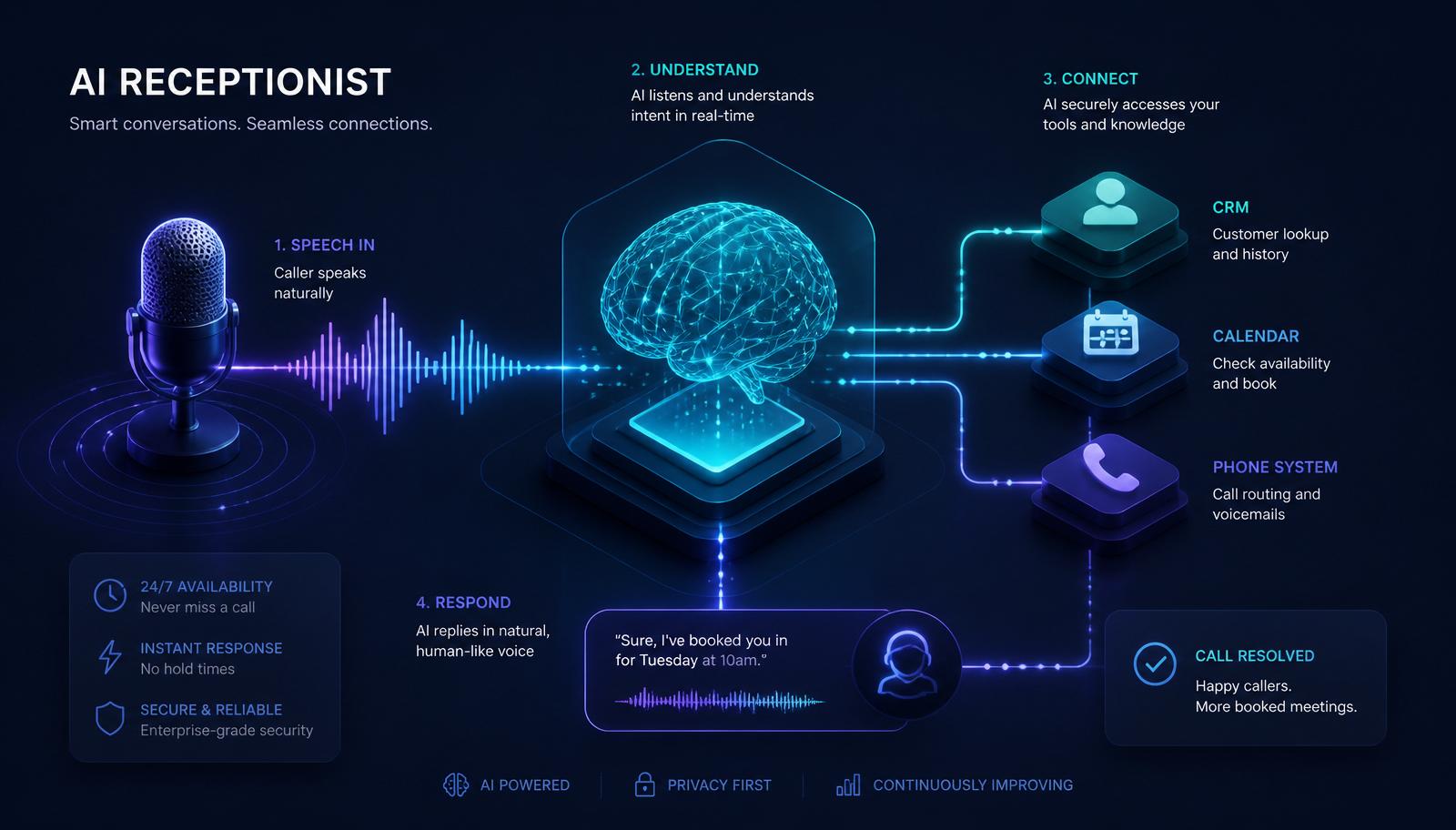
An AI Agent sitting on top of your help docs and past tickets can handle 60–80% of tier-one support without a human. It reads the incoming message, retrieves the relevant docs, drafts a reply, and either sends it (for high-confidence answers) or routes to a human with a suggested response.
The trick is the escalation logic. Good support automation isn't about replacing your team — it's about making sure they only see the tickets that actually need them. Response times drop from hours to seconds; support costs drop 40–60%.
5. Appointment Scheduling
Scheduling looks like a solved problem until you count the edge cases: rescheduling, timezone mistakes, no-shows, buffer times, prep tasks that need to happen before every call. Automation handles all of it.
An intelligent scheduler can:
- Offer time slots based on real availability across multiple team calendars.
- Send confirmation, reminder, and follow-up messages on the right channel.
- Auto-reschedule when someone cancels and trigger the "sorry we missed you" flow when they don't show up.
- Create the CRM record, the Zoom link, the Slack channel, and the prep doc in one shot.
Founders and account executives save 3–5 hours a week that used to disappear into calendar Tetris.
6. Data Entry
If a human is typing the same information into two systems, that's an automation waiting to happen. Invoice line items, expense reports, purchase orders, product SKUs, inventory counts — anything that starts life as a document, a spreadsheet, or a form.
Modern AI can read a PDF invoice, extract the vendor, amount, line items, and dates, and push it straight into your accounting tool. The bookkeeper spends her time on the two invoices that look unusual, not the 98 that don't.
7. Webhook Integrations
Webhooks are the plumbing of modern automation — the moment something happens in one system, another system finds out instantly. Payments, form submissions, subscription changes, shipping events, chat messages. Every SaaS tool worth using in 2026 exposes webhooks.
The unlock is chaining them. A new Stripe payment triggers a workflow that provisions the account, updates the CRM, sends the welcome email, adds the customer to the right Slack channel, kicks off onboarding tasks in the project tool, and updates the revenue dashboard — all before the confirmation page has finished loading.
8. API Integrations
Not every system you rely on has a native integration into your other tools. That used to mean a developer project. In 2026, an API integration workflow can be built in an afternoon — connect to any REST or GraphQL API, transform the data, and land it wherever you need.
This is how businesses get real-time data flowing between internal tools, custom apps, and off-the-shelf SaaS without hiring an engineering team. Reporting stops lagging by a day. Ops stops depending on manual exports.
9. Internal Notifications
Half the messages your team sends are status updates that a workflow could send for them. Automated internal notifications keep everyone informed without anyone writing "quick update" for the fifth time that day:
- New enterprise lead lands in Slack with enrichment attached, so the AE can act in 30 seconds.
- Deployment failed? On-call gets paged with the log excerpt already highlighted.
- Support ticket escalated? Manager sees it before the customer follows up.
- Big deal moved stages? Founder, finance, and CS get a heads-up automatically.
Meetings shorten because nobody has to catch anyone up.
10. Reporting and Analytics
Weekly reports are the single most automatable task in most companies, and yet somebody is always up on Sunday night pulling numbers into a Google Doc. An automated reporting workflow pulls from every source you care about — CRM, ads, analytics, billing, product — aggregates, formats, and delivers a clean summary at the same time every week.
The next level: an AI Agent that reads the report, notices what changed since last week, and writes a short narrative highlighting anomalies. You open Slack Monday morning and the story is already told.
Why n8n Is a Great Automation Platform
Plenty of tools can automate workflows. n8n Automation stands out because it combines three properties that used to be a trade-off:
- Visual, but not toy. You build in a drag-and-drop canvas, but every node runs real JavaScript when you need it. There's no ceiling.
- Self-hostable and privacy-friendly. Sensitive data — customer records, financial data, health information — can live entirely on your own infrastructure.
- AI-native. Every major LLM has first-class support. Building an AI Agent with tools, memory, and retrieval is a workflow, not a codebase.
For business owners who don't want to be locked into per-task pricing, and for teams that need to prove where their data lives, n8n has quietly become the default. It's the platform we recommend and build on for the majority of GetLeadExpo clients.
How GetLeadExpo Helps Businesses Automate Workflows
We don't sell you a platform and walk away. GetLeadExpo builds and maintains the specific automations your business needs, on n8n or the stack you already use, and hands you documentation so your team can extend them.
Our most common engagements:
- [AI Agent Development](/services/ai-agent-development) — production-ready agents with tools, memory, and error handling, not weekend demos.
- [n8n Workflow Automation](/services/n8n-workflow-automation) — custom workflows built, tested, and monitored end-to-end.
- [CRM Automation](/services/crm-automation) — clean pipelines, automated enrichment, and reporting that reflects reality.
- [API Integration](/services/api-integration) — connect any two systems that need to talk, without a full engineering project.
- [Business Process Automation](/services/business-process-automation) — audit your ops, map the workflows, and remove the manual steps.
- [Email Automation](/services/email-automation) — deliverability-safe outbound and lifecycle sequences that actually get replies.
Most clients ship their first workflow in under two weeks and see measurable time savings by month one.
Frequently Asked Questions
1. How much time can AI automation realistically save my business?
For a small team of 3–10 people, a well-scoped first project usually returns 15–25 hours per week within the first month. Larger teams see bigger absolute numbers but similar percentages. The biggest gains come from the messiest workflows, not the cleanest ones.
2. Do I need a developer to build this?
You need someone who understands your workflows and is comfortable with logic and data. Modern platforms like n8n mean you don't need traditional software engineering for most workflows. For complex integrations or custom AI agents, a specialist helps — that's usually where we come in.
3. Will AI automation replace my team?
In our experience, no — it replaces the parts of the job people didn't want to do anyway. Reps stop typing meeting notes and spend more time selling. Support agents stop answering the same five questions and focus on the hard ones. The team gets more strategic, not smaller.
4. How much does it cost to get started?
A single well-scoped automation typically pays for itself in the first month through time saved. Self-hosted n8n runs on a small server for the cost of a few coffees a week. The main investment is building the workflows correctly the first time, which is where working with someone experienced saves you months of iteration.
5. What if my processes change?
Good automations are built to change. Every workflow we build is documented, modular, and easy to extend — so when your process evolves, you're editing a few nodes, not rebuilding from scratch. Bad automation is rigid; well-built automation is a foundation.
Conclusion
The businesses pulling ahead in 2026 aren't the ones with the biggest teams or the flashiest AI demos. They're the ones that quietly automated the ten workflows on this list — one at a time — and gave their people back the hours those workflows were eating.
You don't have to automate everything at once. Pick the one that hurts the most, ship it in the next two weeks, and use the time it frees up to build the next one.
If you want a shortcut, that's what we do every day. Book a free automation audit with GetLeadExpo and we'll map the workflows costing you the most time, show you exactly what to automate first, and — if it makes sense — build it for you. [Get in touch →](/contact)
Ashikur Rahman
Founder, GetLeadExpo
Writing about B2B lead generation, deliverability, and n8n AI automation at GetLeadExpo.