If you have ever missed a customer call while you were with another client, watched a website chat go unanswered because nobody was at the desk, or paid a receptionist to spend her afternoon retyping appointment details into a spreadsheet — you already understand the problem an AI receptionist was built to solve.
An AI receptionist is a virtual front-desk agent that answers phone calls, replies to chats and DMs, books appointments, screens leads, answers FAQs, and hands off to a human when it matters — all day, every day, without a lunch break, sick day, or handover note. In 2026 it is no longer a novelty. It is the front door of any serious service business.
This is the definitive pillar guide. It is longer than any other article you will find on the topic because the topic deserves it: an AI receptionist touches your phone system, your calendar, your CRM, your compliance posture, your brand voice, and your revenue. Cut a corner here and you either overpay for a chatbot in a bowtie, or you build a legitimate 24/7 revenue channel that pays for itself in weeks. If you'd rather skip the reading and just see one live, our [interactive demos](/demo) let you talk to a working AI receptionist for a clinic, dental practice, and diagnostic lab in under 60 seconds.
Table of Contents
- 1. What is an AI receptionist? (short answer)
- 2. The long answer: what it actually does end-to-end
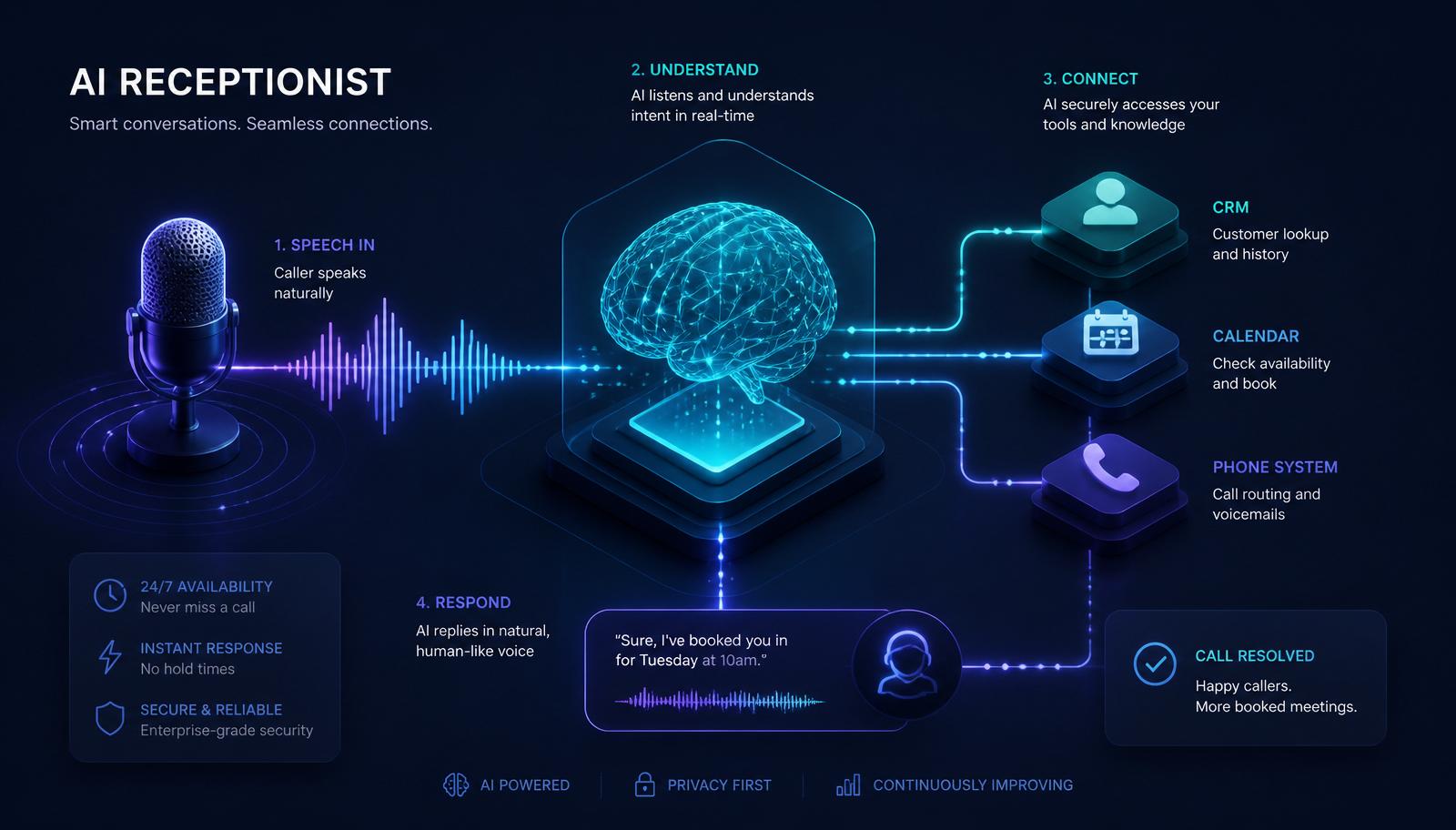
- 3. How an AI receptionist works: the ASR → LLM → TTS pipeline
- 4. Core features and capabilities that separate real receptionists from chatbots
- 5. Channels it covers: voice, chat, SMS, WhatsApp, Messenger, email
- 6. What an AI receptionist is NOT
- 7. AI receptionist vs virtual receptionist vs answering service vs chatbot vs IVR
- 8. Business benefits and the honest ROI math
- 9. Industry-specific use cases: 12 verticals mapped out
- 10. Pricing models in 2026 (per-minute vs flat-rate vs usage-based)
- 11. How to evaluate an AI receptionist provider — the 12-point buyer checklist
- 12. How to launch one in under two weeks
- 13. Security, compliance and data ownership
- 14. Common pitfalls and how to avoid them
- 15. Frequently asked questions (15)
- 16. Bottom line + next steps
1. What Is an AI Receptionist? (Short Answer)
An AI receptionist is software that behaves like a human receptionist across every inbound channel — phone, website chat, WhatsApp, SMS, Facebook Messenger, and email — using conversational AI to understand what a caller wants and then take a real action: book the appointment, answer the question, capture the lead, or route the call.
Three things make it different from a chatbot or an old-school IVR:
- It converses. Natural language, both directions. No "press 1 for sales" menus, no keyword-only chatbots that fall apart the moment a caller says something unexpected.
- It takes action. It writes into your calendar, your CRM, your ticketing system, your database. It doesn't just say things — it *does* things.
- It runs 24/7 on every channel. The same brain handles the 2 AM call, the Sunday chat, and the Monday morning voicemail with the same accuracy and the same brand voice.
If a chatbot is a doorbell, an AI receptionist is the person who answers the door, greets the visitor, checks the calendar, books them in, and updates the household schedule — all before you knew someone knocked.
2. The Long Answer: What It Actually Does End-to-End
A production AI receptionist typically handles ten to fifteen distinct jobs. Not every business needs all of them; most start with three or four and grow into the rest.
Answering the phone
The AI picks up in under one ring, greets in your brand voice, and understands what the caller is asking for. It can qualify (are you a new or existing customer?), triage (is this urgent, sales, or support?), and resolve (yes, we're open Saturday; here's the price; the doctor has a 10:30 opening). A good receptionist AI never says "I didn't get that, could you repeat?" more than once — modern speech recognition is that good.
Booking appointments
The AI reads your live calendar (Google, Outlook, Calendly, Cal.com, or a practice management system like Nexhealth, Jane, or Dentrix), offers real slots that match the caller's stated preferences, and writes the booking back — with confirmation email and SMS reminders queued automatically. A well-tuned booking flow handles rescheduling and cancellation just as smoothly, and understands soft rules like "Dr. Patel doesn't take new patients on Tuesdays."
Answering FAQs
Hours, location, parking, pricing, services offered, insurance accepted, what to bring, dress code, cancellation policy — everything a returning caller ever asks. The AI answers from a knowledge base you control, so the answer is always right and always in your voice. When the knowledge base changes, every channel updates at the same moment.
Website chat & DMs
The same agent runs your live chat widget, replies to Instagram and Facebook DMs, and handles WhatsApp Business threads. Because it's the same underlying brain with unified memory, the caller who chatted last night gets the follow-up call today with full context — no re-qualifying, no "can you remind me what you asked about?"
Lead capture and qualification
Instead of "leave your name and we'll call you," the AI asks the three questions your sales team would ask, scores the lead using rules you define (budget, timeline, industry, geography, source), and drops a fully qualified record into your CRM with a task assigned to the right rep. High-intent leads can auto-trigger an outbound call from a human within minutes — the "speed to lead" advantage that dominates 2026 conversion research.
Message-taking and callbacks
For the edge cases the AI can't (or shouldn't) close on its own, it takes a structured message — name, phone, reason, urgency, best callback window — and hands it off to a human queue with SLA tracking. A well-designed handoff is invisible to the caller.
After-hours coverage
This is where most of the real ROI shows up. Between 40% and 60% of inbound service calls happen outside 9–5, and only about 12% of after-hours callers leave a voicemail. The rest hang up and call your competitor. A 24/7 AI receptionist eliminates that leak. We covered the specifics in our [24/7 AI receptionist guide](/blog/24-7-ai-receptionist).
Multilingual conversations
Modern AI receptionists speak twenty-plus languages fluently and switch mid-call when the caller does. For businesses in border cities, tourist areas, or multi-cultural neighborhoods, this alone can be worth the entire subscription — and it's zero incremental headcount.
Follow-ups and reminders
The AI doesn't stop when the call ends. It sends appointment reminders 24 hours and 1 hour before the visit, follow-up "how did it go?" messages after service, and re-engagement pings to no-shows and unresponsive leads. Every one of these actions can be a workflow in [n8n](/n8n-automation) that runs on your data, not the vendor's.
Payments and deposits
For high-no-show industries (dental, aesthetic, salon, boutique fitness), the AI can take a card at booking and charge a deposit or a full pre-payment. Integration with Stripe, Square, or a merchant of record like Paddle turns a "we'll see if they show" appointment into a committed one.
Reporting
Every call, chat, booking, and hand-off is logged. You get a dashboard with volume, resolution rate, top intents, missed-call recovery, and revenue attribution — the numbers your old receptionist could never give you. Once you have this data, you can price your service better, staff smarter, and see exactly which marketing channels produce paying customers.
3. How an AI Receptionist Works: The ASR → LLM → TTS Pipeline
Under the hood, an AI receptionist is a pipeline of specialized components stitched together. You don't need to understand any of them to buy one — but if you're evaluating vendors, it helps to know what "good" looks like. For a deeper technical treatment, see [How an AI Receptionist Works](/blog/how-ai-receptionist-works).
Step 1 — The caller arrives (ingress)
Someone calls your number, opens your website chat, or messages your WhatsApp Business line. A telephony layer (Twilio, Vonage, Telnyx, or a direct SIP trunk), a chat widget, or a webhook from Meta routes the message into the AI orchestrator.
Step 2 — Automatic speech recognition / ASR (voice only)
For voice calls, the caller's audio is streamed to a real-time transcription engine — Deepgram, Whisper streaming, Google Speech-to-Text, or a fine-tuned domain model. Latency here is what separates a great AI receptionist from an awkward one — good systems transcribe with less than 300 ms delay and emit partial hypotheses so the AI can start "thinking" before the caller finishes speaking.
Step 3 — Voice-activity detection and turn-taking
The system needs to know when the caller has finished a sentence versus taken a breath. Turn-taking is the single hardest engineering problem in voice AI and the biggest quality differentiator between a $99 chatbot voice and a $499 real receptionist. If a vendor won't demo interruption handling on a live call, that's a red flag.
Step 4 — The LLM brain (reasoning)
A large language model (typically GPT, Claude, or Gemini class in 2026) reads the transcribed message plus a system prompt that contains your business context: services, prices, policies, calendar rules, brand tone, escalation triggers. It decides what the caller wants and what to do about it. The *prompt* here often matters more than the specific model — a well-engineered prompt on a mid-tier model beats a lazy prompt on a frontier model every time.
Step 5 — Tools and integrations (action)
The model doesn't just talk — it *calls tools*. Book slot. Look up patient. Send SMS. Query price list. Create CRM contact. Charge deposit. Each tool is a real API call into your calendar, CRM, database, payment processor, or a workflow platform like [n8n](/n8n-automation). This is the layer that turns "chatbot" into "receptionist." A chatbot answers; a receptionist changes state in your business systems.
Step 6 — Text-to-speech / TTS (voice only)
The AI's reply is converted back to speech in a natural, brand-appropriate voice via ElevenLabs, Cartesia, Deepgram Aura, PlayHT, or a custom cloned voice. In 2026 the difference between top-tier AI voices and human voices is measurable only in a lab — most callers no longer notice.
Step 7 — Logging, memory and handoff
Every turn of the conversation is stored, categorized, and — when needed — escalated to a human with full context. Short-term memory holds the current session; long-term memory recognizes returning callers across channels and sessions.
The whole loop takes 800–1,500 milliseconds per turn, which is faster than most humans respond.
4. Core Features and Capabilities That Separate Real Receptionists From Chatbots
Not every product that calls itself an "AI receptionist" clears this bar. Here are the ten features that matter.
Real-time conversation with sub-second latency
Voice AI feels natural under 1.5 seconds per turn. Above 2 seconds, callers start to notice; above 3 seconds, they hang up. Ask any vendor for their p95 turn latency in production, not a demo.
Live calendar integration with write-back
Reading your calendar is table stakes. Writing back — creating events, sending confirmations, handling reschedules — is where most cheaper products fail. Verify write-back on a live call with your actual calendar.
CRM integration with two-way sync
Leads must land in your CRM with the qualification data attached, and the CRM must be the source of truth. If the vendor's dashboard is where the leads live, you don't own your data.
Custom knowledge base you can edit yourself
You should be able to log in, change the price of a service, add a new location, or update your cancellation policy — and see it live on the next call within minutes. No support ticket, no "we'll update your prompt in 5–7 business days."
Multi-language support
Twenty or more languages, automatic language detection, and mid-call switching. In service businesses this converts callers who would otherwise hang up.
Branded voice
Off-the-shelf neural voices are fine to start. Serious businesses eventually clone their own voice (with permission) for consistency across channels.
Human handoff with context
When the AI escalates, the human agent must receive: full transcript, structured summary of what the caller wants, and the CRM record. Anything less makes the handoff worse than not having one.
Compliance controls
For healthcare: HIPAA-eligible infrastructure, BAAs, PHI redaction in logs. For finance: SOC 2 Type II, encryption at rest and in transit. For EU customers: GDPR data residency and DPAs. See our [compliance-focused country guides](/countries) for regional specifics.
Observability
Full transcripts, per-intent resolution rates, hand-off reasons, missed answers. Without observability you cannot improve the system.
Escalation policies you control
You should be able to say "if a caller mentions the word 'lawyer,' escalate immediately" or "if I get more than 5 no-shows this week, page me on Slack." Rule-driven escalation is what makes the system feel yours.
5. Channels It Covers
A modern AI receptionist is channel-agnostic. Deploy once, answer everywhere.
- Voice — inbound phone calls on your business line, forwarded from your existing number or a new dedicated one.
- Website chat — a widget on every page, including sales landing pages and booking flows.
- WhatsApp Business — increasingly the number-one channel for local businesses in EMEA, LATAM and APAC.
- SMS — texts to your business number, including replies to marketing sends.
- Facebook Messenger and Instagram DM — Meta business inbox integration.
- Email — auto-reply and triage on info@ / support@ / bookings@ inboxes.
- Google Business Messages — replies to messages sent directly from your Google Business Profile.
The magic isn't any single channel. It's that the same agent handles all of them with unified memory, so a lead who chats on your site Monday and calls Tuesday isn't asked the same qualifying questions twice.
6. What an AI Receptionist Is NOT
Because the term is loose, it's worth being explicit about what does *not* count.
- A menu-based IVR. "Press 1 for sales" is not conversational and cannot take action.
- A keyword chatbot. If it can only match a fixed set of phrases, it isn't a receptionist — it's a decision tree with a nice avatar.
- A voicemail transcription service. Recording and emailing the message is not answering the call.
- A human answering service. Great humans exist, but they cost 10–30x more and don't scale past their headcount.
- A one-way form. Even a fancy contact form doesn't converse, qualify, or book.
- An AI SDR. SDR tools do outbound cold outreach. A receptionist answers inbound. Different jobs, different KPIs.
If a vendor can't demonstrate the agent booking a real appointment or updating a real CRM record on a live demo call, it's a chatbot, not a receptionist.
7. AI Receptionist vs Virtual Receptionist vs Answering Service vs Chatbot vs IVR
Buyers often conflate five different things. They are not the same.
- IVR. "Press 1 for billing." Deterministic, no NLU, no action beyond routing. Cost: near zero. Value in 2026: near zero.
- Chatbot. Keyword or shallow-NLU rules on a website widget. Handles FAQ deflection at best. Cost: $0–$99/month. Value: real, but capped.
- Answering service. A remote human takes messages and forwards them. Cost: usually $1.00–$1.50/minute. Coverage depends on staffing.
- Virtual receptionist. Also a remote human, usually with better training and light booking. Cost: $250–$1,500/month depending on volume. Still capped by shift schedules.
- AI receptionist. Software. Answers instantly, 24/7, scales to unlimited concurrent conversations. Cost: typically flat monthly fee starting around $199–$499, plus low per-minute or per-conversation overage. Handoff to humans only for edge cases.
If you already have a great human receptionist, an AI receptionist is not a replacement — it's the overflow, after-hours, and multi-channel layer that keeps her from drowning. Full breakdown in [AI receptionist vs human receptionist](/blog/ai-receptionist-vs-human-receptionist).
8. Business Benefits and the Honest ROI Math
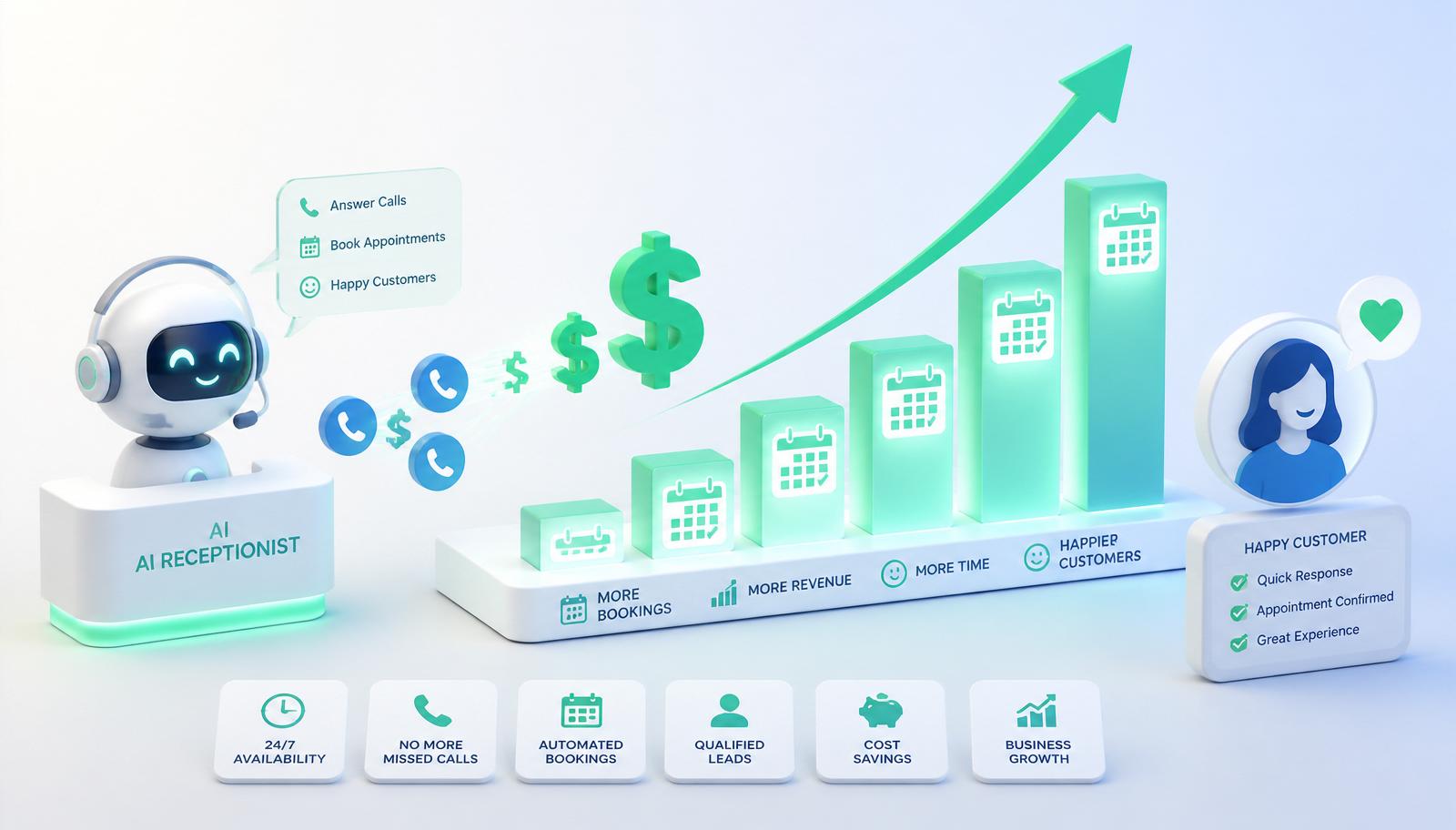
You don't buy an AI receptionist for the technology. You buy it for four measurable outcomes that show up within the first 30 days of go-live.
- Missed-call recovery. Businesses typically see missed inbound drop from 15–35% to under 3%. For a service business, that's the single biggest revenue swing on the list.
- After-hours bookings. New revenue that literally did not exist before. Overnight and weekend appointments start appearing on Monday morning calendars.
- Front-desk hours reclaimed. The receptionist stops taking 60% of calls, so she has time to actually help walk-ins, follow up on no-shows, and do the higher-value work.
- Response time collapse. Website chat replies drop from "4 hours" to "under 5 seconds," and studies consistently show sub-5-minute response beats next-day response by 3–8x on conversion.
A worked example
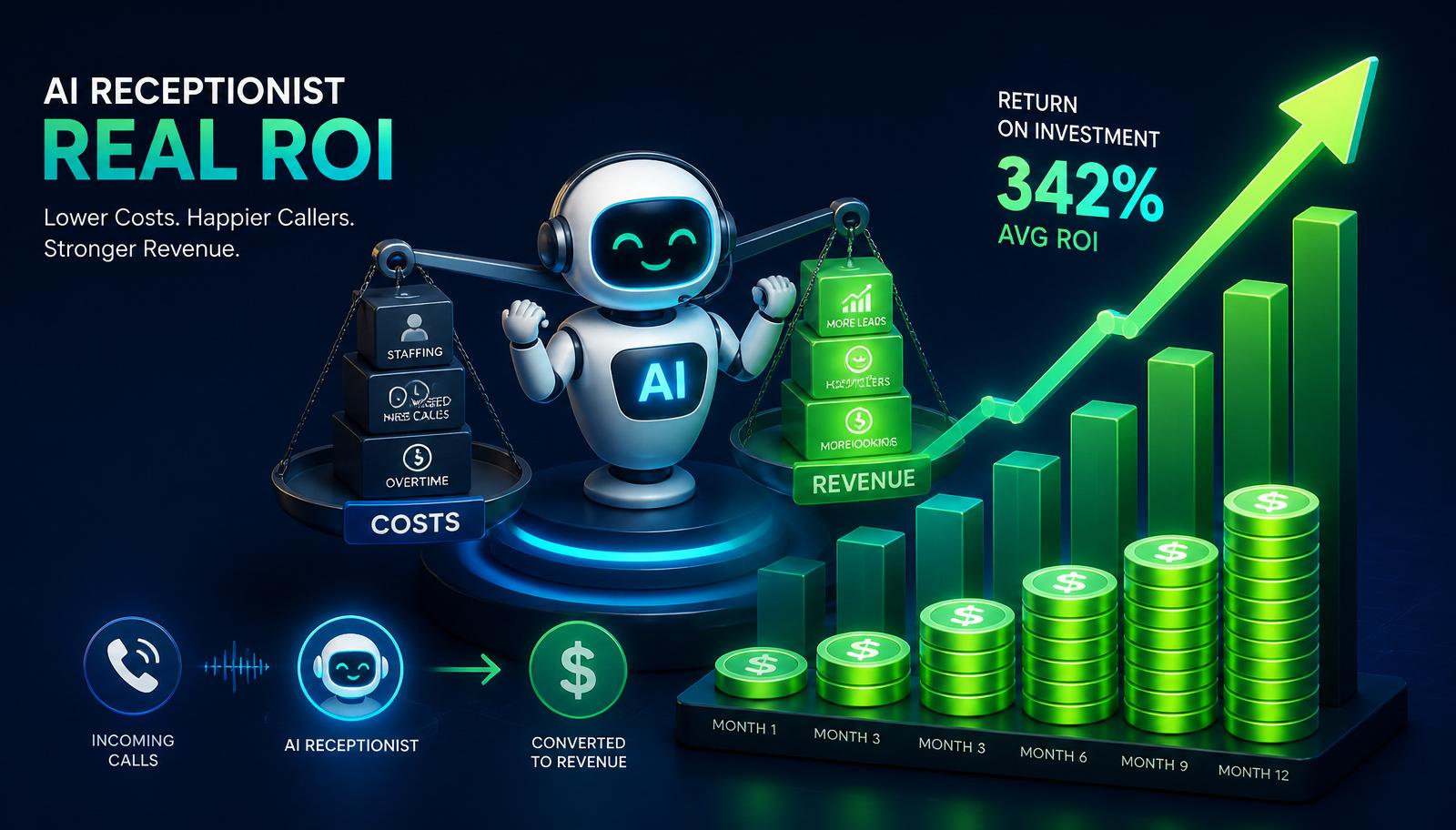
A dental practice takes 800 calls/month. 25% go to voicemail (200 calls). Historically, 18 of those 200 become patients at an average lifetime value of $1,200. Deploy an AI receptionist that captures 92% of those 200 previously-missed calls at the same 9% booking rate, and you add roughly 16 new patients/month — around $19,000/month in incremental lifetime revenue against a $499/month subscription. Full ROI breakdown in our [AI receptionist ROI guide](/blog/ai-receptionist-roi).
If you'd like to run the math for your specific business, our [contact page](/contact) includes a quick calculator.
9. Industry-Specific Use Cases
An AI receptionist pays back the fastest in businesses where every missed call is a lost booking. Here is what deployment looks like across twelve verticals — each linked to a dedicated industry page or a case study.
- [Dental clinics](/industries/dentists) — new-patient intake, insurance verification, after-hours emergency triage. Deposit-taking cuts no-shows.
- [Medical clinics and practices](/blog/ai-receptionist-for-medical-clinics) — appointment booking, prescription refill routing, symptom triage with strict escalation rules.
- [Real estate agencies](/industries/real-estate) — showing bookings, ISA-style qualification of buyer/seller leads, listing FAQ answers.
- [Solar and home improvement](/industries/solar) — high-intent lead capture, financing pre-qualification, appointment setting for design consults.
- [Law firms](/industries/law-firms) — intake qualification, conflict-of-interest screening prompts, escalation to attorney on urgent matters.
- [Insurance agencies](/industries/insurance) — quote requests, policy questions, renewal reminders.
- [Roofing, HVAC, plumbing](/industries/roofing) — dispatch-style triage (emergency vs scheduled), service-area qualification, quote booking.
- [Restaurants and hospitality](/industries/restaurants) — reservations, private-event inquiries, catering leads.
- [SaaS companies](/industries/saas) — inbound sales qualification, tier-1 support deflection, demo booking.
- [Marketing agencies](/industries/marketing-agencies) — new-business intake, project scoping questions, gatekeeping to owner's calendar.
- [Accounting and financial services](/industries/accounting-firms) — client intake, seasonal overflow (tax season), document-collection reminders.
- [Home services and construction](/industries/home-services) — quote requests, service-area validation, follow-up on aging estimates.
Explore the [full industry hub](/industries) for the complete list, or see our [case study library](/case-studies) for real deployments.
10. Pricing in 2026
Pricing has settled into three tiers in 2026, with three underlying pricing models.
The three pricing models
- Per-minute — $0.10–$0.40 per voice minute, sometimes with a small monthly base. Great for low, unpredictable volume. Dangerous at scale — a viral moment on TikTok can 10x your bill overnight.
- Flat-rate with usage caps — a fixed monthly fee (e.g. $499/month) for up to N minutes or conversations, then modest overage. The most predictable model.
- Usage-based per conversation — $0.50–$2.00 per completed conversation regardless of length. Common for chat-only deployments.
The three tiers
- Entry / SMB (approx. $199–$499/month). One channel (usually voice OR chat), 200–500 conversations included, standard integrations. Perfect for a solo practice, small clinic, or new agency.
- Growth (approx. $500–$1,500/month). Multi-channel, 1,000–3,000 conversations, custom knowledge base, calendar and CRM integrations, custom voice.
- Enterprise ($1,500+/month). Unlimited channels, custom LLM behavior, on-premise or private cloud, dedicated success manager, SLAs, HIPAA / SOC 2 controls.
Add to that a one-time setup / customization fee ($500–$5,000) depending on the depth of integration. Compared to the fully-loaded cost of a single receptionist ($3,500–$6,000/month once you count benefits, coverage, and turnover), the math is not close. We publish a full [AI receptionist pricing guide](/blog/ai-receptionist-pricing-guide) covering per-minute vs flat-rate vs usage-based models.
11. How to Evaluate an AI Receptionist Provider — The 12-Point Buyer Checklist
Not all AI receptionists are created equal. Score any vendor on these twelve criteria before signing. Use it side-by-side with our [AI receptionist buyer guide](/blog/ai-receptionist-buyer-guide).
1. Latency. Under 1 second per turn on voice, under 3 seconds on chat, measured on a live call — not a demo video. 2. Real integrations. Can it *write* to your calendar and CRM, not just read? 3. Custom knowledge base. Can you edit answers, prices, and policies yourself, in minutes? 4. Handoff quality. How does it hand off to a human, and what context goes with it? 5. Analytics. Do you get intent breakdown, missed-recovery, and revenue attribution? 6. Voice quality. Would a first-time caller notice it wasn't human? If yes, keep looking. 7. Ownership of data. You own the transcripts, the leads, the knowledge base. Not the vendor. 8. Model portability. Can the same setup swap between GPT/Claude/Gemini as the market evolves? 9. Compliance posture. SOC 2, HIPAA BAA, GDPR DPA available where you operate? 10. Escalation rules. Can you write custom escalation rules without engineering help? 11. Uptime SLA. 99.9% or better, with published status page. 12. Contract terms. Month-to-month options and no penalty to export your data.
At [GetLeadExpo](/services/ai-receptionist) we build custom AI receptionists on the [n8n automation](/n8n-automation) stack, which means every integration is inspectable, exportable, and yours.
12. How to Launch One in Under Two Weeks
The realistic timeline for a well-scoped launch is 8–14 days. It looks like this:
- Days 1–3 — Discovery. Map your call types, pull three months of call logs, agree on top intents.
- Days 4–6 — Build. Wire up telephony, calendar, CRM, and the knowledge base. Train the voice.
- Days 7–9 — Internal QA. Team makes 50+ test calls across scenarios; you sign off on the flow.
- Days 10–12 — Soft launch. Route 20% of real calls to AI, monitor transcripts, tune.
- Days 13–14 — Full launch. 100% of inbound to AI, human handoff on defined triggers.
If you want a version of this timeline tailored to your business, [book a free consultation](/contact) and we'll walk you through it. For a more technical walkthrough see [How to build an AI receptionist](/blog/how-to-build-an-ai-receptionist).
13. Security, Compliance and Data Ownership
The three questions every buyer must answer before signing:
- Who owns the transcripts? Answer must be "you do." Vendor may retain aggregated analytics; raw transcripts and PII must remain your property with an export mechanism.
- Where does the data live? For EU / UK customers, insist on EU data residency. For US healthcare, HIPAA-eligible infrastructure and a signed BAA. For finance, SOC 2 Type II.
- Is your data used to train models? Answer must be "no, unless you opt in." Anything else and you are subsidizing a competitor's product.
For jurisdiction-specific compliance (TCPA for US, GDPR for EU/UK, CASL for Canada, Privacy Act for Australia and NZ), see the compliance sections in our [country guides](/countries).
14. Common Pitfalls and How to Avoid Them
Seven mistakes we see repeatedly in the first year of deployment.
- Under-scoping the knowledge base. The AI is only as good as what it knows. Budget half a day to write a proper FAQ before launch.
- Skipping the soft-launch phase. Going from 0 to 100% traffic is how bad experiences reach real customers. Route 20% for three days first.
- Confusing chatbot vendors for receptionist vendors. If the demo doesn't book a real slot on a real calendar, it is not a receptionist.
- Ignoring handoff quality. A great AI with a broken handoff still loses the caller. Test the human handoff before you buy.
- No escalation rules. "Escalate on the word lawyer" is a rule. "The AI will figure it out" is not.
- No observability. If you can't see what the AI said, you can't fix what it said wrong.
- Buying on price alone. The $99/month product costs you $10,000 in missed bookings. The $499 product doesn't.
15. Frequently Asked Questions
Is an AI receptionist actually reliable enough for a real business?
Yes, provided you buy from a vendor that measures uptime, latency, and intent-resolution rate publicly. The failure mode is almost never "the AI broke" — it's "the AI wasn't given the right knowledge or the right integration." Both are your side of the fence, and both are fixable in a well-scoped rollout.
Will customers know they're talking to AI?
You can disclose or not — regulations vary by country and industry (healthcare especially). Good practice is to introduce the AI by name and note it's a virtual assistant. In our own testing, callers overwhelmingly do not mind, as long as the AI actually resolves their reason for calling.
What happens when the AI doesn't know the answer?
It says so — honestly — and either offers a callback, opens a ticket, or routes to a human. A confident "I don't know, let me get you to someone who does" beats a hallucinated wrong answer every time. Modern models are tuned specifically to prefer escalation over guessing.
Can it integrate with my existing calendar and CRM?
If your calendar is Google, Outlook, Calendly, Cal.com, Nexhealth, Jane, or almost anything mainstream — yes. If your CRM is HubSpot, Salesforce, Pipedrive, Zoho, GoHighLevel, or virtually anything with an API — yes. n8n is the connective tissue for the long tail.
Can I customize the voice?
Yes. You can clone a specific voice (usually your own receptionist's, with permission), pick from a library of premium neural voices, or match your brand persona (warm, professional, energetic, calm).
How much of the setup do I actually have to do?
For a done-for-you build with GetLeadExpo: you approve the intents, hand over calendar and CRM access, record a 5-minute voice sample if you want a custom voice, and review the QA calls. That's it — usually 3–4 hours of your time across two weeks.
Is my data secure?
Look for vendors that offer encryption in transit and at rest, don't train models on your data, and can sign HIPAA BAAs or SOC 2 attestations if your industry needs them. We treat this as table stakes.
Does it work for outbound calls too?
Some products offer outbound (appointment reminders, follow-ups, reactivation campaigns). Cold outbound is a different regulatory beast — check TCPA in the US and equivalent local laws before enabling.
How does it handle accents and non-native English?
Modern ASR handles the major English accents well and 20+ other languages fluently. For narrow accents (heavy regional dialects), run a pilot week to measure error rate. It is almost always usable.
What about high call volumes and concurrency?
AI receptionists scale to unlimited concurrent conversations. A viral moment or seasonal spike is a non-event — no busy tone, no queue, no dropped calls.
Can I keep my existing phone number?
Yes. Port your number to the vendor's telephony provider or configure conditional forwarding (forward on busy, no answer, or unconditional) from your current carrier.
What is the difference between an AI voice agent and an AI receptionist?
An AI voice agent is a component (voice-first conversational AI). An AI receptionist is a product (voice + chat + integrations + workflows across your whole front desk). See our [AI Voice Agent service](/services/ai-voice-agent) and [AI Receptionist service](/services/ai-receptionist) for the distinction.
Will it replace my receptionist?
For most businesses, no. It replaces the *interruptions* — the 60% of calls that are FAQs, bookings, and status updates. Your human stays for the high-value 40% and finally gets time to do it well.
How do I measure whether it is working?
Track four numbers weekly: missed-call rate, after-hours bookings, chat response time, and CSAT on completed conversations. If all four are trending the right way at day 30, keep going. If not, tune.
What if the AI makes a mistake with a customer?
Every serious vendor supports full transcript review and a "correction workflow" — you (or the human agent) can send a corrected follow-up and the AI learns not to repeat the mistake. Combine with escalation rules so mistakes surface fast.
16. Bottom Line + Next Steps
An AI receptionist in 2026 is not a chatbot, not a novelty, and not a threat to a good receptionist. It's the layer that finally makes "always available, always accurate, always fast" affordable for every service business — from solo practices to national chains.
If you're missing calls, losing chat leads, or paying a front desk to do work a computer could do better, the ROI conversation is short.
Next steps:
- See a working AI receptionist tailored to your industry on the [interactive demo hub](/demo).
- Read the [24/7 AI receptionist guide](/blog/24-7-ai-receptionist) for the after-hours ROI breakdown.
- Compare against a human receptionist in [AI receptionist vs human receptionist](/blog/ai-receptionist-vs-human-receptionist).
- See the full [feature list](/blog/ai-receptionist-features) and [pricing guide](/blog/ai-receptionist-pricing-guide).
- Get the [buyer guide](/blog/ai-receptionist-buyer-guide) and [2026 trends report](/blog/ai-receptionist-trends).
- Ready to talk? [Book a free consultation](/contact) and we'll design one for your business.
---
Related services
- [AI Receptionist](/services/ai-receptionist)
- [AI Voice Agent](/services/ai-voice-agent)
- [n8n Automation](/n8n-automation)
- [Lead Generation](/lead-generation)
Related articles in the AI Receptionist cluster
- [How an AI Receptionist Works](/blog/how-ai-receptionist-works)
- [AI Receptionist Benefits](/blog/ai-receptionist-benefits)
- [AI Receptionist Features](/blog/ai-receptionist-features)
- [AI Receptionist Pricing Guide](/blog/ai-receptionist-pricing-guide)
- [AI Receptionist ROI](/blog/ai-receptionist-roi)
- [24/7 AI Receptionist](/blog/24-7-ai-receptionist)
- [AI Receptionist vs Human Receptionist](/blog/ai-receptionist-vs-human-receptionist)
- [Best AI Receptionist Software](/blog/best-ai-receptionist-software)
- [How to Build an AI Receptionist](/blog/how-to-build-an-ai-receptionist)
- [AI Receptionist Buyer Guide](/blog/ai-receptionist-buyer-guide)
- [AI Receptionist Trends 2026](/blog/ai-receptionist-trends)
- [Future of AI Receptionists](/blog/future-of-ai-receptionists)
- [AI Receptionist for Medical Clinics](/blog/ai-receptionist-for-medical-clinics)
- [AI Receptionist for Dental Clinics](/blog/ai-receptionist-for-dental-clinics)
Sources & further reading
- Salesforce — State of Service Report
- HubSpot — Consumer Trends Research
- Google Consumer Insights — Missed-call studies for local businesses
- Gartner — Conversational AI Market Forecast, 2026
- Twilio — Voice AI Reliability Documentation
Ashikur Rahman
Founder, GetLeadExpo
Writing about B2B lead generation, deliverability, and n8n AI automation at GetLeadExpo.