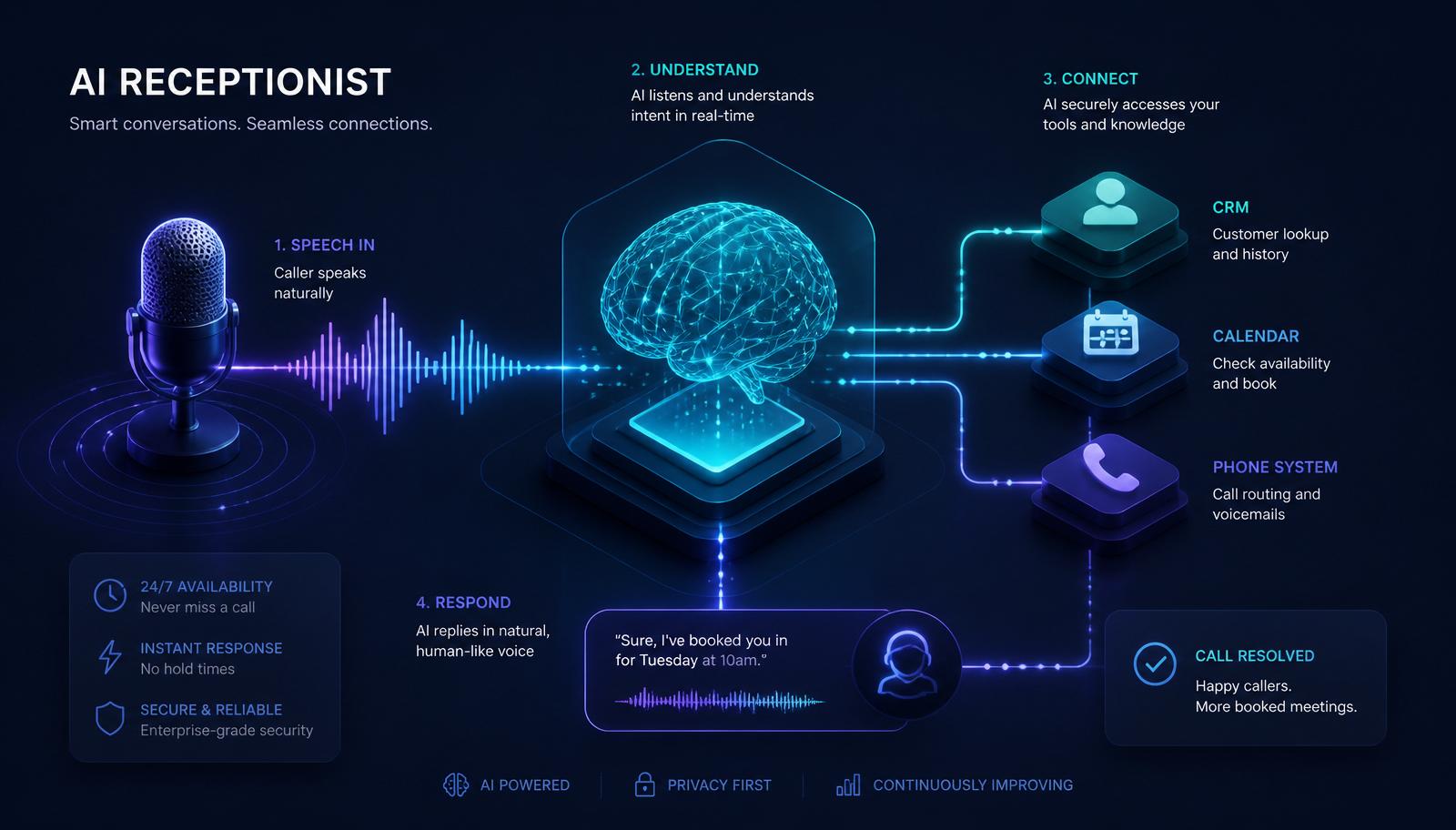
Ask ten vendors how their AI receptionist works and you'll get ten different marketing slides. Ask an engineer and you'll get a diagram with six boxes, four APIs, and a warning about latency. This guide is the engineer's version — written for business owners who want to know exactly what they're buying, and for technical buyers who want to know exactly what to ask.
By the end you'll understand the full pipeline from "the phone rings" to "the booking is in your calendar," which parts matter, which parts are marketing fluff, and how to tell a serious AI receptionist from a chatbot in a bowtie.
If you're new to the concept, start with [What Is an AI Receptionist?](/blog/what-is-an-ai-receptionist) first, then come back here.
Table of Contents
- 1. The 30-second overview
- 2. The full pipeline, box by box
- 3. Voice channel: what happens in the first 500 ms
- 4. Chat, WhatsApp, DM: same brain, simpler pipe
- 5. The LLM brain and why the *prompt* matters more than the model
- 6. Tools: how the AI actually *does* things
- 7. Memory: short-term, long-term, and cross-channel
- 8. Handoff to a human
- 9. Observability: logs, transcripts, analytics
- 10. Security, compliance, and where the data lives
- 11. Failure modes and how good systems recover
- 12. How GetLeadExpo builds it on n8n
- 13. FAQ
- 14. Bottom line
1. The 30-Second Overview
An AI receptionist is a real-time loop of five specialized components:
1. Ingress — a phone call, chat, SMS, or DM arrives. 2. Perception — audio becomes text (or the text arrives as text). 3. Reasoning — a large language model decides what the caller wants and what to do next. 4. Action — the model invokes real tools: book the slot, update the CRM, send the SMS. 5. Response — the reply is generated as text and, for voice, spoken back in a natural voice.
Every turn of the conversation runs the full loop in roughly 800–1,500 milliseconds — faster than a distracted human receptionist can look up from her second monitor.
2. The Full Pipeline, Box by Box
Here's what a production AI receptionist actually looks like from left to right.
- Telephony provider — Twilio, Vonage, Telnyx, or a direct SIP trunk. Owns the phone number and streams inbound audio to a WebSocket.
- Real-time speech-to-text (STT) — Deepgram, Whisper streaming, Google Speech-to-Text, or a custom model. Transcribes with partial hypotheses so the AI can start "thinking" before the caller finishes speaking.
- Voice-activity detection (VAD) and turn-taking — decides when the caller has finished a sentence versus taken a breath. This is the single hardest engineering problem in voice AI and the biggest quality differentiator.
- Orchestrator — the glue. Manages session state, calls the LLM, handles tools, streams the reply back to TTS. In our stack, this is [n8n](/n8n-automation) or a bespoke Node/TS service.
- LLM — GPT, Claude, Gemini, or a fine-tuned open model. Reasons about intent and decides which tool to call.
- Tool layer — the actual APIs the AI is allowed to hit: calendar, CRM, database, ticketing, payment, SMS.
- Text-to-speech (TTS) — ElevenLabs, Cartesia, Deepgram Aura, or PlayHT. Streams audio back with sub-300 ms first-byte latency.
- Datastore — Postgres, DynamoDB, or Firestore for session state, transcripts, and analytics.
- Handoff bridge — the mechanism that puts a human on the line with full context when the AI decides to escalate.
The whole thing looks intimidating on a diagram. In production it fits in about 1,200 lines of orchestration code plus a well-designed prompt.
3. Voice Channel: What Happens in the First 500 ms
Voice is the hardest and most-scrutinized channel. Here's the exact sequence, in the first half-second of a call.
- T + 0 ms — the PSTN routes the call to your number. Telephony provider answers.
- T + 80 ms — SIP handshake completes. A WebSocket opens between telephony and the orchestrator.
- T + 120 ms — the pre-recorded or synthesized greeting starts playing. "Hi, thanks for calling Careplus Clinic, how can I help?" The caller hears sound *before* they've said a word.
- T + 200 ms — audio frames from the caller begin streaming in. STT starts producing partial transcripts.
- T + 500 ms — VAD detects the first pause. The orchestrator freezes the current transcript, packages it plus prior turns plus the system prompt, and fires off the LLM request.
By T + 1,300 ms typical, the first sentence of the AI's response is already being spoken through TTS. Anything much slower feels awkward. Anything much faster feels wrong (like the AI interrupted). Tuning turn-taking is 80% of what makes a voice AI feel human.
4. Chat, WhatsApp, DM: Same Brain, Simpler Pipe
For chat channels the pipeline is a strict subset of the voice one — no STT, no TTS, no VAD. The message arrives as text via webhook (Meta for WhatsApp / Messenger / Instagram, Twilio for SMS, your site widget for live chat), the orchestrator runs the same LLM + tools loop, and the reply is posted back through the same webhook.
Because it's the *same brain and same tools*, a caller who chats with the AI on your website Monday and calls Tuesday gets seamless continuity — the AI already knows their name, previous questions, and any open task in your CRM.
5. The LLM Brain — Why the Prompt Matters More Than the Model
Buyers obsess over which model powers an AI receptionist. In reality, once you're on a frontier model (GPT-5, Claude 4, Gemini 2), the model itself is largely a commodity. What matters is the system prompt, the tool definitions, and the knowledge base you provide.
A production system prompt for an AI receptionist typically includes:
- Identity. Who the AI is, what business it works for, and what tone to use.
- Scope. What it should answer, what it should politely decline, and what it should escalate.
- Policies. Business rules — cancellation windows, insurance accepted, price disclosure rules.
- Knowledge slots. Structured data pulled at runtime: current hours, live prices, active promotions.
- Tool guidance. When to call which tool, and what to say while waiting for a tool to return.
- Guardrails. Never invent prices. Never quote medical advice. Always confirm before writing to the calendar.
Two vendors running the exact same underlying model can produce wildly different experiences. The prompt is 90% of the product.
6. Tools — How the AI Actually *Does* Things
This is what separates a chatbot from a receptionist.
Modern LLMs support "tool calling" (a.k.a. function calling): you register a schema like this and the model can decide to call it.
Example tool definitions a real AI receptionist has access to:
- check_availability(service, date_range) — reads the live calendar and returns open slots.
- book_appointment(patient_id, service, slot) — writes the booking and returns a confirmation code.
- lookup_patient(phone_or_email) — retrieves existing records for returning callers.
- create_lead(name, phone, source, notes) — writes a new CRM contact and assigns a task.
- send_sms(to, message) — sends a confirmation, reminder, or link.
- transfer_to_human(reason, urgency) — the escalation switch.
The LLM produces a JSON tool call, the orchestrator executes it against your real systems (usually through [n8n](/blog/n8n-workflow-automation-guide-2026) workflows, direct APIs, or a lightweight backend), and the result is fed back into the conversation. The AI narrates naturally ("Great, I've got you booked for Tuesday at 10:30, I'll text you a confirmation") while all of that happens behind the scenes.
7. Memory — Short-Term, Long-Term, and Cross-Channel
Three memory layers, each solving a different problem.
- Turn memory — the last N turns of the current conversation, kept in the LLM context. Handles "wait, actually make that Wednesday instead."
- Session memory — the full conversation, stored in the datastore. Available if the caller reconnects within a defined window.
- Persistent memory — the CRM. Cross-channel and cross-session. The reason the AI remembers a returning caller's name, history, and preferences six months later.
Well-designed AI receptionists keep the LLM context small (to save cost and latency) by summarizing older turns and pulling only relevant facts from persistent memory on demand.
8. Handoff to a Human
Every serious AI receptionist has an explicit escalation policy. Common triggers:
- Caller explicitly asks for a human.
- Detected emotional distress or complaint above a defined threshold.
- Medical, legal, or financial question that policy requires a human answer to.
- Repeated failure of the AI to resolve the same request.
- VIP contact flagged in CRM.
The handoff itself has two flavors:
- Warm transfer (voice). The AI stays on the line, briefs the human agent in one sentence ("It's Sarah Kim, existing patient, has a question about her Tuesday appointment"), then drops off.
- Ticket handoff (async). The AI creates a fully populated ticket — transcript, summary, urgency, suggested next action — and drops it in the queue with SLA tracking.
The quality of handoff is where cheap AI receptionists fall over. If a human has to re-ask the caller everything the AI just asked, you've failed.
9. Observability — Logs, Transcripts, Analytics
Everything is logged: caller ID, channel, timestamp, full transcript, tool calls made, tool results, latency per turn, intent classification, escalation events, and outcome (booked / resolved / escalated / abandoned).
Aggregated into a dashboard, you get:
- Volume by hour, day, channel.
- Intent breakdown — how many bookings, how many FAQs, how many complaints.
- Resolution rate — % handled end-to-end by the AI vs escalated.
- Missed-recovery — how many after-hours or overflow calls were captured.
- Revenue attribution — how many of yesterday's bookings originated with the AI.
This is data your old receptionist could never give you, and it's typically the reason operators fall in love with the system inside a month.
10. Security, Compliance, and Where the Data Lives
The right answers here depend on your industry.
- Baseline (every industry). TLS in transit. AES-256 at rest. No training on customer data by default. Full audit logs.
- Healthcare. HIPAA BAA with the vendor and every subprocessor. PHI segregated in a dedicated tenant. De-identified analytics only.
- Financial services. SOC 2 Type II. PCI-DSS scope carefully managed if any payment info touches the AI.
- EU. GDPR data-processing agreement, EU data residency options, DPIA.
- Enterprise. Private cloud or on-prem deployment option, customer-managed keys (BYOK).
Ask vendors for their attestations in writing before you sign. Anyone who dodges the question is telling you what you need to know.
11. Failure Modes and How Good Systems Recover
Things that can and do go wrong, and what a mature system does about them.
- Model hallucinates a price. Mitigation: prices come from a tool, not the prompt. The model is instructed never to invent numbers.
- STT mishears. Mitigation: confidence scoring on transcripts, confirmation loops on high-stakes numbers ("Just to confirm, that's five, five, five, four, three, two, one — correct?").
- Calendar API is down. Mitigation: graceful fallback to "Let me have someone call you back within an hour to lock that in" plus a ticket in the escalation queue.
- Model latency spikes. Mitigation: a shorter fallback model on a second provider, plus a filler phrase ("One moment while I check…") to buy 500 ms.
- Caller trips a policy guardrail. Mitigation: safe refusal + escalation, never silent failure.
The single biggest quality gap between top-tier and mediocre AI receptionists is not the model — it's how the system behaves on the 5% of turns where something isn't perfect.
12. How GetLeadExpo Builds It on n8n
Our stack, in brief:
- Telephony: Twilio Programmable Voice (or a client's existing SIP provider).
- STT: Deepgram streaming with custom domain vocab.
- VAD & turn-taking: custom, tuned per language and per client.
- Orchestrator: [n8n](/n8n-automation) workflows for tools and integrations, with a lightweight TypeScript layer for the streaming loop.
- LLM: GPT-4o or Claude 3.7 Sonnet by default; per-tenant override.
- TTS: ElevenLabs Turbo v2 or Cartesia Sonic, custom voice on request.
- Tools: Google/Outlook Calendar, Cal.com, HubSpot, GoHighLevel, Salesforce, Pipedrive, Zoho, Airtable, Postgres — anything with an API.
- Datastore: Postgres (Supabase in most deployments).
- Handoff: SIP warm-transfer for voice; ticket + Slack ping for chat.
Because every workflow lives in n8n, you can inspect, edit, and export every integration you own. There is no black box. Compare that to the closed-box SaaS AI receptionists on the market — you'll see why we prefer this route. Read the deep-dive on [building AI agents with n8n](/blog/building-ai-agents-with-n8n) for the reasoning.
Want to see it live? Every one of our [interactive demos](/demo) — [Careplus Clinic](/demo/careplus-clinic), [Smile Dental](/demo/smile-dental), [Prime Diagnostic Lab](/demo/prime-diagnostic-lab), and the auto-generated demos across [25+ industries](/demo) — runs on the exact stack described above.
13. Frequently Asked Questions
How long does a typical AI receptionist reply take?
Voice: 800–1,500 ms per turn end-to-end. Chat: 1–3 seconds. Under 1 second on voice is table stakes for a premium build.
Which LLM should I choose?
Any current frontier model (GPT-4o / GPT-5, Claude 3.7+, Gemini 2 Pro) is more than capable. Pick the one your vendor has the best prompt engineering and tool integration for. Model changes are a Tuesday afternoon in a well-built system.
Does the AI need training data from my business?
No, not in the machine-learning sense. It needs a well-populated knowledge base (services, prices, policies, hours, common FAQs) and clean integrations. Both are configuration, not training.
Can it detect emotion or urgency?
Yes. Modern models pick up frustration, distress, urgency, and other cues from tone (voice) and phrasing (chat), and can be instructed to escalate accordingly.
What about accents and dialects?
Frontier STT models handle major English accents and 40+ languages reliably. For very heavy regional dialects, custom acoustic models or a bilingual human backstop help. Test with your actual caller mix before signing.
Does it work with my old on-prem PBX?
Almost always — SIP is a universal standard. Your integrator sets up a SIP trunk between the PBX and the AI. Zero rip-and-replace.
What happens if the internet goes out at my office?
Nothing — the AI lives in the cloud, not on your network. Callers keep getting a great experience even when your office is dark.
14. Bottom Line
An AI receptionist isn't magic and it isn't a chatbot. It's a well-orchestrated pipeline of specialized components — telephony, STT, LLM, tools, TTS — glued together with a great prompt, real integrations, and mature failure handling.
Once you understand the pipeline you can evaluate any vendor in ten minutes: ask about latency, tool integrations, prompt design, memory, handoff quality, observability, and compliance. If they can answer clearly, you're talking to a real one.
Want us to design and build one for your business? [Book a free consultation](/contact) and we'll map the pipeline to your exact tech stack and call volume.
---
Related services
- [AI Receptionist](/services/ai-receptionist)
- [n8n Automation](/n8n-automation)
Related articles
- [What Is an AI Receptionist?](/blog/what-is-an-ai-receptionist)
- [24/7 AI Receptionist](/blog/24-7-ai-receptionist)
- [AI Receptionist vs Human Receptionist](/blog/ai-receptionist-vs-human-receptionist)
- [Building AI Agents with n8n](/blog/building-ai-agents-with-n8n)
- [n8n Workflow Automation Guide 2026](/blog/n8n-workflow-automation-guide-2026)
Sources & further reading
- Deepgram — Real-Time Streaming STT Documentation
- ElevenLabs — Turbo v2 Voice Latency Benchmarks
- OpenAI — Function Calling Best Practices
- Twilio — Programmable Voice Reference
- n8n — AI Agent Node Documentation
Ashikur Rahman
Founder, GetLeadExpo
Writing about B2B lead generation, deliverability, and n8n AI automation at GetLeadExpo.